

Canvas - Continuing Education Instance
Overview
Continuing Education Instance: https://uws-ce.instructure.com
- Used for continuing education courses
- For UWS and non-UWS users. The only part of the DLE Canvas instance that can be open to the public.
- Often uses Canvas Catalog as an entry point to register for courses.
- Integrates with payment gateway for payments related to continuing education courses.
- Non-UWS users can register and authenticate for access to continuing education courses, UWS users are authenticated through the Federated System.
User Accounts
UWS students, instructors, and staff automatically have access to Canvas through the Instructional instance and don't need a separate Continuing Education instance account. They can see their Continuing Education courses by logging in to the Instructional instance. This happens automatically through a one-way trust relationship between the Instructional instance and the other instances.
Non-University of Wisconsin System users can be invited to create an account via an invitation to a course. These Continuing Education-specific accounts don't provide access to the Instructional or Training & Development instances of Canvas or other UWS enterprise resources such as email and Office 365.
Logging Into Continuing Education
- Access the Universities of Wisconsin Continuing Education Login Page.
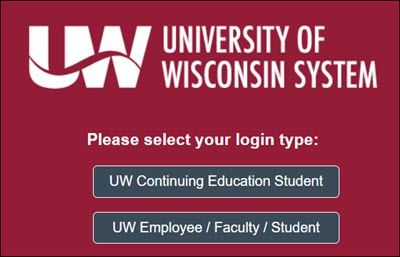
- Determine which method for login you will use to login. Click the appropriate button for your affiliation.
- UW Continuing Education Student - Users who have an account affiliated with a personal email account, employer account or any other email other than a University campus will use this option.
- UW Employee / Faculty / Student - Users with login credentials from any University of Wisconsin institution should use this method. This option will direct you to the a page in which you can choose your campus affiliation and login using your campus credentials.
- Users who have chosen the UW Continuing Education Student option will be able to enter login credentials.
- Login: This is an email address that would have been used to invite you to the course.
- Password: Enter the password you used to create your account. If you do not remember your password, please use the "Forgot password?" link towards the bottom of the page.

NOTE: If you do not receive a link to reset your password, it may be for one of the following reasons.- The message was sent to your Spam/junk folder.
- The email address you are entering was not used to create your account.
- Some employer IT systems view messages from Canvas as spam, contact your organization's IT department for assistance.
- Click the Login button.
- Your Canvas Dashboard will be displayed.
Note: if you have trouble accessCourse Enrollment
Users can enroll in Continuing Education courses in two ways:
- Email invitation
- Canvas Catalog
For more information on each of these methods, see the Canvas - How do I register for and access my Continuing Education course? guide.
Catalog
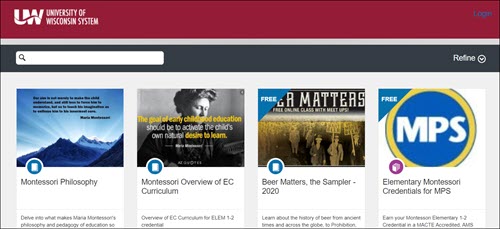
Canvas Catalog is the public portal for Continuing Education courses. Campuses can use the Catalog to attract and enroll non-UW users. For an overview, see the What is Canvas Catalog? and How do I use my institution's Catalog? guides.
Users can browse courses in the UWSA Catalog at: https://uws-ce.catalog.instructure.com/
UW institutions can set up the Canvas Catalog to accept payment through approved payment gateways, to allow students to pay for Continuing Education courses directly in the Catalog.
Course Notifications
Course reminders emails sent to personal inboxes (those addresses not affiliated with a specific campus, @gmail.com, @yahoo.com, @icloud, etc) may be filtered as SPAM or Junk. It may be helpful to add 'notifications@instructure.com' to your email whitelist.