

Canvas (Accessibility) - UDOIT Advantage SpeedFIXIT Feature
The SpeedFIXIT feature in UDOIT Advantage is enabled for the Universities of Wisconsin (except Madison) Digital Learning Environment (DLE). Campuses utilizing the DLE are able to use the SpeedFIXIT to rapidly fix color contrast and image-related issues in Canvas courses.
NOTE: SpeedFIXIT is a Beta feature and may not always function as expected. If you encounter any issues, please submit a support ticket including information about the issue to dlesupport@support.wisconsin.edu.
What can SpeedFIXIT Currently fix?
- Images should not have a placeholder as alt text
- Image elements should have an “alt” attribute
- Alternative Text is more than the maximum allowed characters
- Alt text for images within links should not be empty
- Insufficient text color contrast with the background
Accessing SpeedFIXIT
- Click "Course Accessibility Checker (UDOIT)" in the left navigation menu of a Canvas course.
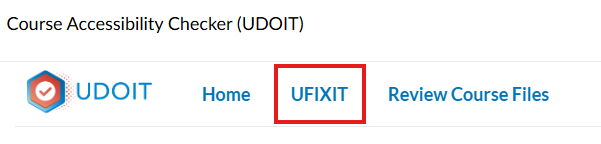
- Once UDOIT has scanned the course, click UFIXIT in the UDOIT menu.
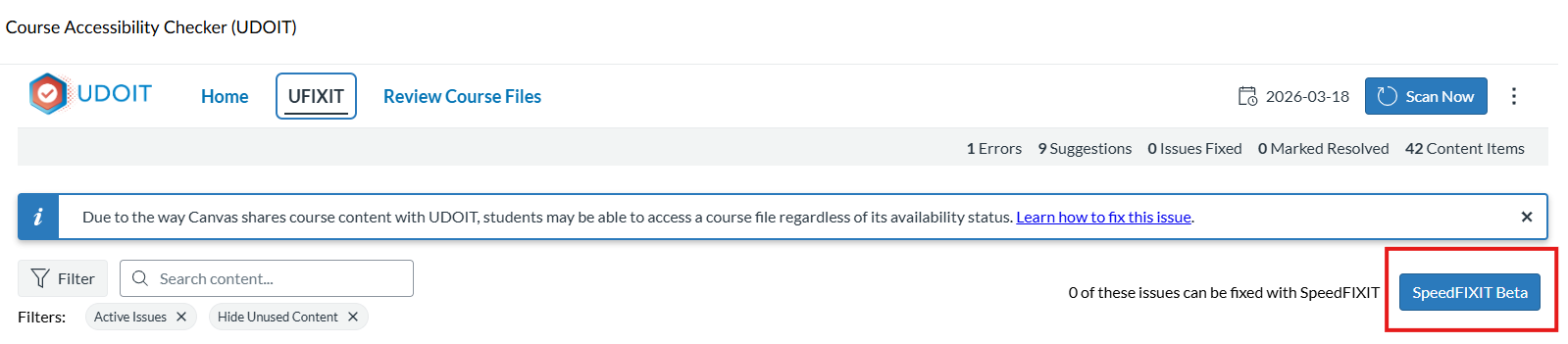
- The "SpeedFIXIT Beta" button will appear along with an indication of how many issues it can resolve. Click the button to access SpeedFIXIT.
- SpeedFIXIT will automatically suggest alt text and acceptable color contrast combinations for issues
More Information about SpeedFIXIT
For more detailed information about SpeedFIXIT, consult UDOIT's User Guide: SpeedFIXIT instructions